Ofi Watercolor Design Set: A Practical Toolkit for Creative Projects
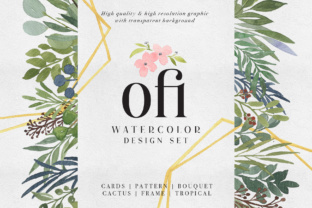
The Ofi Watercolor Design Set is a versatile collection of hand-drawn watercolor graphics designed to support a wide range of creative and professional tasks. Whether you're crafting invitations, designing product packaging, or building brand assets, this set offers ready-to-use visuals that blend artistic charm with functional flexibility. Its contents are thoughtfully organized across multiple themes, making it easy to integrate into different stages of a project.
What's Included and How It Fits Into Your Workflow
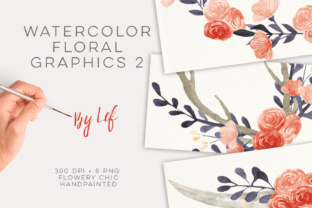
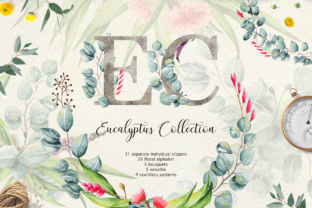
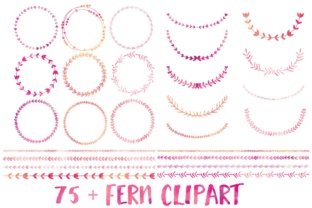
The set includes a variety of file types and design elements, each serving a specific purpose in the creative process. With 4 watercolor graphics in the Tropical Edition, 5 in the Cactus Edition, 9 in the Bouquet Edition, and 11 Watercolor Floral Frames, you have a broad visual palette to choose from. These can be used early in a project to explore visual direction or later to refine details like borders and backgrounds.
The 12 Watercolor Cards provide pre-designed templates that can be customized for greeting cards, announcements, or promotional materials. Meanwhile, the 15 Watercolor Pattern PAT files are designed for Adobe Photoshop users who need seamless textures for backgrounds or product mockups. These pattern files are especially useful in the production phase when consistency and scalability matter most.
Using the Files: PNG vs. PAT and Software Compatibility
The Ofi Watercolor Design Set includes both PNG and PAT file formats, each with its own use case. PNG files are universally compatible and can be opened in most graphic design software, including Canva, Affinity Designer, and GIMP. This makes them ideal for quick edits and integration into digital workflows where flexibility is key.
The PAT files, on the other hand, are exclusive to Adobe Photoshop. These pattern files are perfect for creating repeating backgrounds or textured overlays without losing quality. If you're working on a print project like packaging or fabric design, these patterns can streamline your workflow by eliminating the need to manually tile or adjust graphics.
Preparing Your Files for Use
Before diving into your project, take time to organize the files based on your intended use. If you're designing a wedding invitation, for example, you may want to group floral frames and bouquet graphics together. For a branding project, the tropical or cactus editions might provide a modern, nature-inspired aesthetic that aligns with your brand identity.
Consider creating a folder structure that mirrors your project phases—such as ideation, layout, and finalization. This helps you locate the right graphics quickly and keeps your design process efficient. Naming files clearly and maintaining version control can also prevent confusion, especially when working across multiple tools or collaborating with others.
Integrating Into Design Platforms and Tools
Whether you're using Adobe Photoshop, Illustrator, or a more accessible tool like Canva, the Ofi Watercolor Design Set integrates smoothly into your preferred design environment. For users of Adobe Creative Cloud, the PAT files unlock advanced functionality, allowing you to apply watercolor textures directly within your document without layering multiple images.
If you're working in a non-Adobe platform, the PNG files offer a reliable alternative. You can import them directly into your layout and adjust size, opacity, and layer order to achieve the desired effect. This compatibility ensures that even users with limited software access can benefit from the set's visual richness.
Designing for Different Applications
The versatility of the Ofi Watercolor Design Set lies in its ability to support a variety of use cases. Here are a few practical applications:
- Invitations and Greeting Cards: Use the floral frames and card templates to create elegant, personalized designs for weddings, birthdays, or thank-you notes.
- Business Branding: Incorporate watercolor elements into logos, social media graphics, or marketing materials to add a handcrafted, approachable feel.
- Product Packaging: The pattern files are especially useful for designing custom packaging that stands out on shelves or online marketplaces.
- Print-on-Demand: If you're selling digital goods or physical products through platforms like Etsy or Shopify, these graphics can help you create cohesive, professional-looking designs quickly.
Optimizing for Efficiency and Consistency
One of the biggest advantages of using the Ofi Watercolor Design Set is the time it saves during the creative process. Instead of sourcing or creating watercolor graphics from scratch, you can start with high-quality, pre-designed elements that are ready to use. This is especially valuable when working under tight deadlines or managing multiple client projects.
To maintain visual consistency, consider creating a design system or style guide using the set's elements. Define which graphics will be used for headers, backgrounds, and accents, and establish rules for color usage and layering. This not only speeds up the design process but also ensures that your final output feels cohesive and intentional.
Quality Control and Long-Term Use
When using any design asset, it's important to assess quality before finalizing your work. The Ofi Watercolor Design Set delivers high-resolution graphics that maintain clarity at different sizes, making them suitable for both digital and print applications. However, always preview your designs at full scale and check for any pixelation or alignment issues.
For long-term use, store the files in a secure, organized location—preferably backed up in the cloud or on an external drive. If you're part of a team or agency, consider adding these graphics to a shared asset library so that everyone has access to the latest versions. This helps avoid duplication and ensures brand consistency across all projects.
Final Thoughts: Making the Most of the Ofi Watercolor Design Set
The Ofi Watercolor Design Set is more than just a collection of graphics—it's a practical resource that fits into real creative workflows. Whether you're a freelancer building client deliverables, a small business owner designing marketing materials, or a hobbyist creating personalized gifts, this set offers a streamlined way to incorporate beautiful, hand-drawn visuals into your work.
By understanding how to organize, integrate, and optimize these files, you can make the most of their flexibility and quality. The key is to treat them as part of a broader design process, where preparation, compatibility, and efficiency all play a role in achieving professional results.