Watercolor Blossom: A Guide to Choosing and Using Floral Elements for Creative Projects
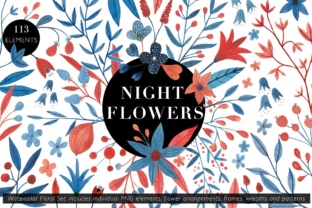
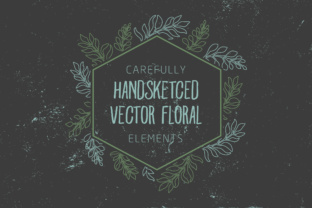
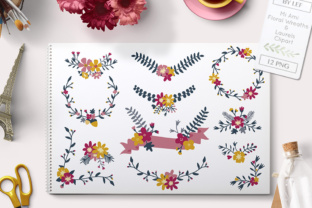
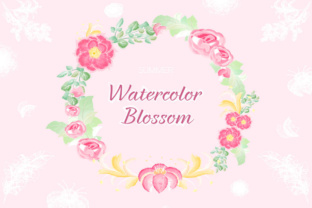
Watercolor Blossom offers a stunning collection of floral elements—petals, leaves, twigs, and blossoms—perfect for creating soft, natural designs. Whether you're a blogger designing a seasonal post, a small business owner crafting a brand identity, or a hobbyist working on a personal project, these watercolor elements bring a touch of organic beauty to your work. Available in both Ai and PNG formats, this set gives you the flexibility to edit and scale without losing quality.
Why Watercolor Blossom Stands Out
What makes Watercolor Blossom especially appealing is its versatility. The soft, painterly textures and vibrant summer tones make it ideal for a wide range of creative applications—from digital illustrations and greeting cards to social media templates and branding materials. Designers love how these elements blend seamlessly into both minimalist and layered compositions.
However, even the best resources can fall short if not used correctly. Many people overlook key considerations when choosing and applying watercolor graphics, which can impact the final outcome of their projects.
1. Ignoring File Format Compatibility
One of the most common issues users face is downloading Watercolor Blossom in Ai format without having the proper software to open it. Adobe Illustrator is required to edit vector files, while PNGs can be used in almost any image-editing program. If you're not familiar with vector editing, sticking with the PNG format may save you time and frustration.
Better approach: Before downloading, confirm which format suits your software and skill level. If you're using Canva, Photoshop, or Figma, PNG files will be more practical for your workflow.
2. Overlooking Resolution and Scaling
Even though PNGs are widely compatible, they are raster images. This means they can lose quality when scaled up. Some users download the PNG version of Watercolor Blossom and try to use it in large-format prints or banners, only to find the images appear blurry or pixelated.
Better approach: For print projects or large-scale designs, choose the Ai format to maintain crisp lines and clarity at any size. If you must use PNGs, always check the resolution—300 DPI is ideal for print, while 72 DPI works for web use.
3. Using Too Many Elements at Once
The Watercolor Blossom set includes a wide variety of floral elements. While it's tempting to use them all in one design, overcrowding can make your layout feel cluttered and unprofessional. It's easy to lose the elegance of watercolor when too many petals, leaves, and twigs compete for attention.
Better approach: Select a few key elements and layer them thoughtfully. Use negative space to let your design breathe. Consider grouping elements around a central focal point, like a flower or a title, to guide the viewer's eye naturally.
4. Matching the Color Palette to Your Project
Watercolor Blossom features vibrant summer tones, but not every color combination will suit your brand or message. Some creators apply these floral graphics without adjusting the hues to match their existing color scheme, resulting in a mismatched or jarring design.
Better approach: Use your editing software to tweak the colors of the floral elements. Adjusting saturation, brightness, or hue can help integrate the graphics more seamlessly into your design. For example, if your brand colors are muted pastels, reduce the vibrancy of the original watercolor tones to match.
5. Not Considering File Size and Load Time
When using Watercolor Blossom for web projects like blogs or landing pages, file size matters. Large PNG files can slow down your website, affecting both user experience and SEO performance.
Better approach: Compress PNG files before uploading them to your site. Tools like TinyPNG or Squoosh can reduce file size without compromising quality. Alternatively, use SVG versions if available, especially for simpler watercolor graphics.
What to Check Before Downloading Watercolor Blossom
Before you download Watercolor Blossom, take a few moments to review the product details carefully. Many resources come with usage licenses that restrict commercial use or require attribution. Ignoring these terms can lead to legal issues, especially if you're using the graphics in client work or for marketing materials.
- License type: Make sure the resource allows for your intended use—personal or commercial.
- File contents: Confirm whether the download includes both Ai and PNG formats, and how many individual elements are included.
- Support and updates: Check if the creator offers customer support or future updates for the set.
Also, look for user reviews or previews to get a realistic idea of the quality and variety of the elements included. Don’t rely solely on promotional images, which may be enhanced or curated to show only the best parts of the set.
Getting the Most Out of Watercolor Blossom
Watercolor Blossom is more than just a collection of pretty graphics—it's a tool that, when used correctly, can elevate your creative work. Whether you're designing a logo, crafting a digital newsletter, or preparing print materials for a small business, the key is to understand both the potential and the limitations of the resource.
Don’t be afraid to experiment with blending modes, opacity settings, and layer styles in your design software. These features can help you create depth and dimension in your compositions. For example, using a soft light blending mode on a watercolor petal can make it appear as if it's part of the background rather than a separate element.
Also, consider pairing Watercolor Blossom with other design assets like hand-drawn icons, soft textures, or clean typography to create a cohesive visual style. Mixing elements thoughtfully can give your project a unique and professional finish.
Ultimately, the success of your design depends not just on the quality of the graphics you use, but on how you apply them. Watercolor Blossom gives you the raw materials—your creativity and attention to detail will bring them to life.